
Skip to content
Login

Getting Started

5
  • Introduction
  • How to Register on Onigiri Loyalty Platform?
  • How to Login with Phone?
  • How to Login with Email?
  • How to Recover your Account Password?

Cards Creation

8
  • Stamp
  • Multipass
  • Cashback
  • Certificate
  • Coupon
  • Membership
  • Discount
  • Reward

How To Install the Card

5
  • iPhone (iOS)
  • Android
  • PWA Cards on Android
  • Google Pay on Android
  • How to Restore the Card

Customers (CRM)

4
  • Customer Profile
  • Import/export
  • Customer Filters
  • RFM Analysis

Managers

3
  • Add/ Edit/ Delete
  • Manager Profile
  • Statistics

Dashboard

1
  • Dashboard

Feedback Collection

1
  • Feedback collection

Geolocations

2
  • Geolocations
  • How to Access Locations Section?

Push Notifications

16
  • How it Works?
  • iPhone (iOS)
  • Android
  • How long does it take for push messages to be received by our customers?
  • Why aren’t my customers receiving push messages?
  • Push Section
  • Marketing Push
  • Sending messages to all customers
  • Sending messages to a segment of customers
  • Sending message to an individual customer
  • Geo-push
  • Push automation
  • Feedback collection
  • Next visit reminder
  • Birthday congratulation
  • Triggered auto-push

Settings

8
  • API Documentation
  • Suki Card API Access
  • Settings
  • Plan
  • Personal Settings
  • Integrations
  • Webhooks
  • How the Referral System Works

Scaner App

11
  • How Scanner App Works
  • Installation
  • Login in the Scanner App
  • Scanner app – Stamp
  • Scanner app – Multipass
  • Scanner app – Cashback
  • Scanner app – Certificate
  • Scanner app -Coupon
  • Scanner app – Membership
  • Scanner app – Discount
  • Manager Seats

Web Development

1
  • Using the Suki Cards Visual Feedback Tool
View Categories
  • Home
  • Docs
  • Push Notifications
  • How it Works?

How it Works?

A closer look into how the push notifications work

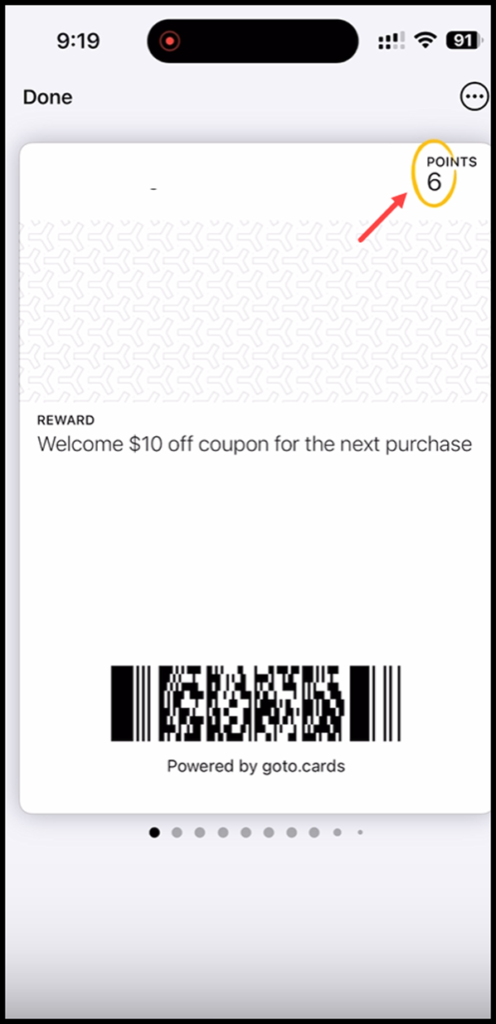
1. Once enabled, push notifications are automatically displayed on the lock screen of your iOS device.

2. Tapping a notification opens the card and if there is any change in the points you have earned, it is highlighted in the top-right corner of the screen.
Updated on October 20, 2023

What are your Feelings

  • Happy
  • Normal
  • Sad

Share This Article :

  • Facebook
  • X
  • LinkedIn
  • Pinterest
Triggered auto-pushiPhone (iOS)
SUKI CARD

Digital Loyalty for Local Businesses

FacebookInstagramEmail

QUICK LINKS

How It Works
Growth Suite
Case Studies
Web Development
Blog
Demo

SUPPORT

FAQ
Testimonials
Help Center
Affiliate Program

GET STARTED

Start Free Trial · Book a Free Call · Create Account

Works with Apple Wallet & Google Wallet

© 2026 Suki Card. All rights reserved. · Privacy · Terms